
Contents
A sudden increase in CPC on your own brand keywords usually means that something changed in the auctions.
A higher average CPC does not necessarily mean that a keyword suddenly became more expensive. Google confirms that actual CPC is affected by auction competitiveness, Ad Rank, ad quality, the search context, and the expected impact of ad assets. That context includes the user’s search, location, device, and time of day, so the same keyword can cost more in one auction and less in another.
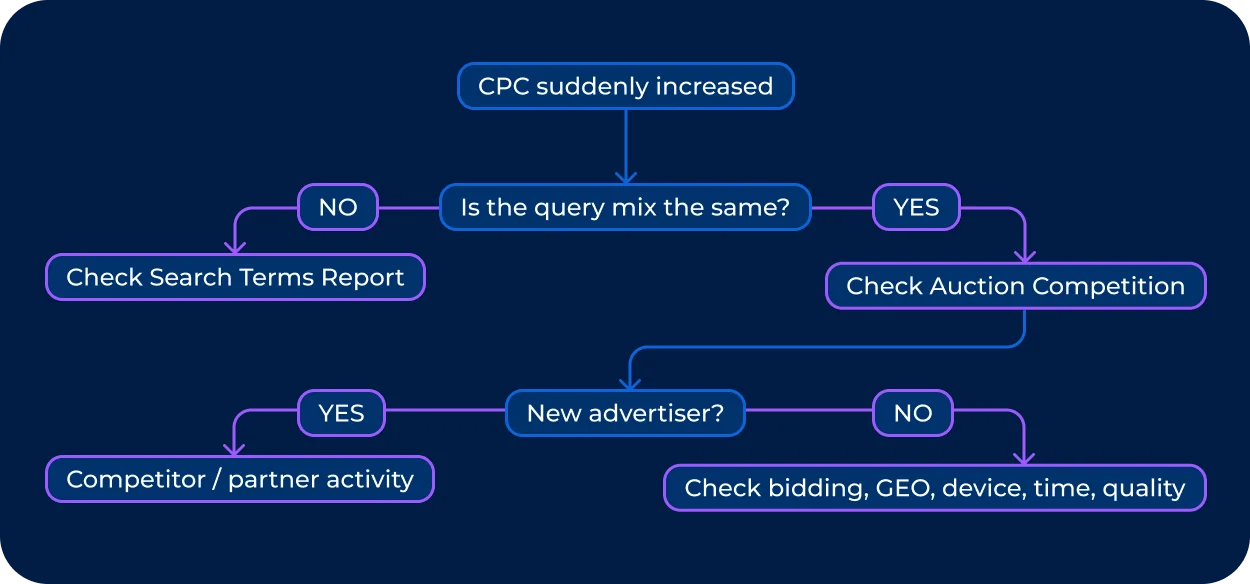
So when your average CPC suddenly jumps, start with these six questions:
-
- Did the actual CPC increase, or did the mix of searches change?
-
- Did competition in the auctions increase?
-
- Did anything change in our own bidding or campaign setup?
-
- Did CPC rise only in certain locations, devices, or times?
-
- Did ad quality change?
This guide breaks down each possibility and explains what you should check before changing bids.
First, Check Whether Your CPC Really Became More Expensive
Before investigating who entered the auction, make sure you are comparing CPC for a genuinely comparable set of searches. The spike may be limited to certain segments. A more expensive GEO, device, or time of day can pull the overall average upward.
We recommend starting by comparing the periods immediately before and after the spike:
| What to compare | What it can show |
|---|---|
| Avg. CPC | Whether costs actually increased |
| Clicks | Whether low volume distorted the average |
| Impressions | Whether search demand changed |
| CTR | Whether the traffic mix shifted |
| Search terms | Whether new queries appeared |
| Match type | Whether matching became broader |
| Device | Whether traffic shifted to a more expensive device |
| Location | Whether the GEO mix changed |
| Hour/day | Whether traffic concentrated in costly auctions |
| Impression Share | Whether you lost visibility |
| Search Lost IS (rank) | Whether Ad Rank became insufficient |
After making sure the problem actually exists, start looking into the likely reasons behind it.
Possible Reason #1: Your Own Bidding
Your own Google Ads setup can push keyword CPC up, too. Rule out changes you made yourself before attributing the spike to someone else in the auction.
Check whether anything changed around the date the increase started:
-
• Bid strategy — switching strategies can change how aggressively Google bids.
-
• Target CPA or target ROAS — changing the target can alter bidding behavior.
-
• Target Impression Share — particularly relevant for brand campaigns, where advertisers may deliberately bid to maintain a certain level of visibility.
-
• Bid adjustments — device, location, or other adjustments can shift the bids entering individual auctions.
-
• Budget — a higher budget can give an automated strategy more room to compete.
-
• Campaign structure — moving keywords between campaigns or changing targeting can alter which auctions they enter.
-
• Bid limits — changes to minimum or maximum bid constraints can affect how far automated bidding is allowed to go.
Google notes that changes to bid strategies, targets, budgets, bids, and bid modifiers can cause performance fluctuations.
This is especially easy to miss with automated bidding. If CPC rises while you use Smart Bidding, it does not automatically mean competitors bidding on your brand become more aggressive. The strategy may simply be bidding higher to pursue its optimization goal.
For example, Target Impression Share can be used on brand campaigns specifically to aim for a chosen level of visibility. If that target or its settings changed, higher CPC may follow even when the competitive landscape stayed roughly the same.
What to check
Open Google Ads → Change History and compare the date when CPC started rising with changes to:
-
• bid strategy and targets;
-
• budgets;
-
• bid adjustments or limits;
-
• keywords and match types;
-
• campaign settings.
Possible Reason #2: More Advertisers Are Competing for Your Brand Keywords
Google says actual CPC is affected by auction competitiveness and the Ad Rank of other advertisers. You pay what is needed to clear the relevant Ad Rank threshold and beat the competition.
The mechanism is roughly:
_A new advertiser enters → auction becomes more competitive → stronger Ad Rank is needed to retain the same position → the amount required to win can increase → actual CPC rises. That does not automatically mean “your competitor raised their bid, so Google raised CPC.” Ad Rank also depends on ad quality, the context of the search, thresholds and other factors. And as Auction results are calculated for each search, competition can vary from one auction to the next. _
What to check
Go to Auction Insights. Compare the period before and after the spike and look for changes in:
-
• Impression Share
-
• Overlap Rate
-
• Position Above Rate
-
• Outranking Share
-
• Top of Page Rate
-
• Absolute Top of Page Rate
Google specifically provides this data for comparing advertisers that participate in the same auctions, with reporting available at keyword level and segmentation by time and device.
Possible Reason #3: Your Brand CPC May Have Changed Because the Searches Changed
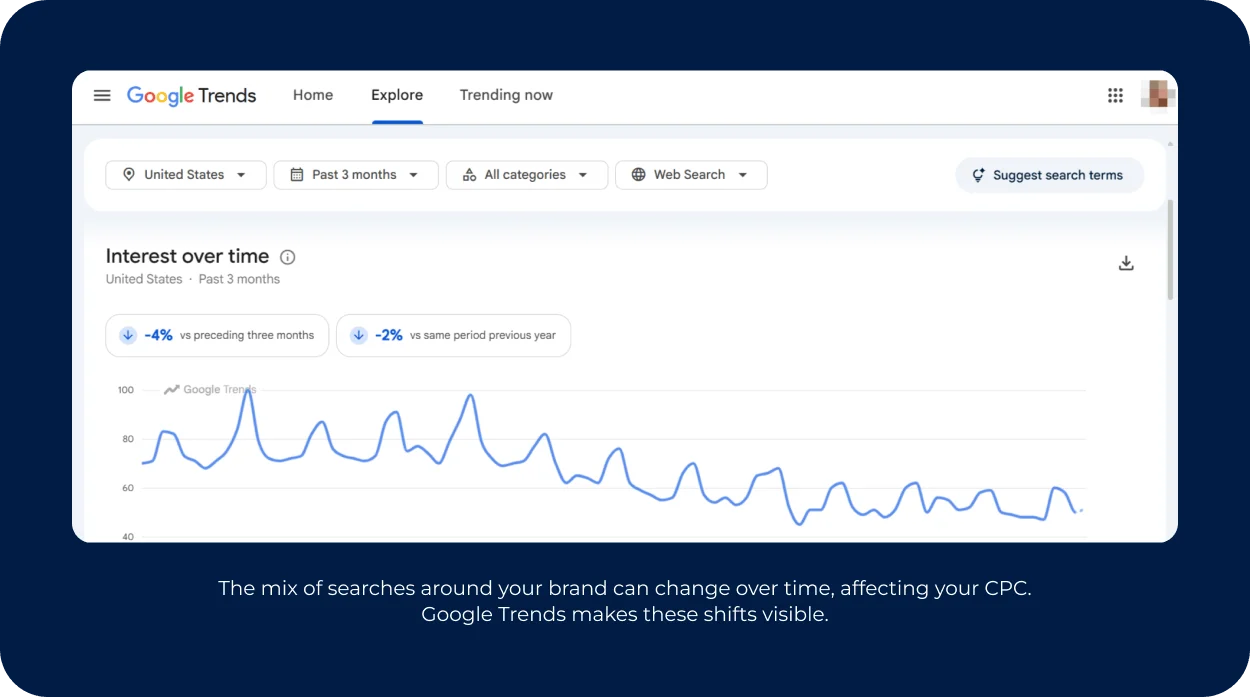
Average CPC is not a fixed price attached to a particular keyword. It is an average across your clicks. That means CPC can rise even when the cost of individual core brand searches barely changes.
For example, yesterday your traffic might have looked like this:
-
• 90% = exact brand name
-
• 10% = brand + product
And today it’s:
-
• 50% = brand name
-
• 30% = brand + product
-
• 20% = broader queries and close variants
If those searches enter different auctions or have different levels of competition, the average CPC can move simply because the mix changed.
This is one reason a campaign can suddenly show more high CPC keywords without a single dramatic change in the core brand auction.
What to check
Open the Search Terms Report and compare the periods before and after the spike. Look at:
-
• actual search queries;
-
• match type;
-
• the keywords that triggered each ad;
-
• CPC by search term;
-
• conversion rate by search term.
If your keyword is a brand name, don't stop the analysis there. Check what people actually searched. A useful comparison is to group queries into buckets — core brand, brand + product, brand + category, misspellings, and broader/related searches — then compare their CPC and share of clicks before and after the spike. That tells you whether the CPC keyword actually became more expensive, or whether your campaign simply started buying a different mix of searches.
Possible Reason #4: Location, Device and Time Can Push Brand CPC Higher
A keyword does not enter the same auction each time a user “googles” it. The search engine considers the context of each auction, including location, device, search characteristics, etc. Ad Rank thresholds can also vary depending on factors such as location and device.
So if the average CPC jumps from $1 to $2, don't assume that all your branded traffic suddenly became twice as expensive.
The increase could be concentrated in one slice of traffic:
- • CPC in the US increased slightly;
- • mobile CPC jumped sharply;
- • more searches started happening in the evening;
- • a competitor became active in one region;
- • a particular device/location combination became more competitive.
What to check
Break the CPC down by: CPC → country → device → day/hour
Then compare each segment with the previous period.
For example, a spike concentrated in a particular country may point to a local competitor, reseller, or affiliate rather than a change across an entire account. Similarly, if desktop CPC is stable but mobile CPC doubled, you have a very different problem from a brand-wide increase in auction pressure.
The same breakdown is useful when checking high CPC keywords. If the increase appears only during specific hours or in specific locations, look at who is present in those auctions before changing bids across the whole campaign.
Possible Reason #5: Your Ad Quality or Landing Page Changed
Low ad quality, slow loading, broken pages, redirects, or a less relevant destination can make an otherwise healthy brand campaign perform differently.
What to check
Check:
- • Quality Score
- • Expected CTR
- • Ad relevance
- • Landing page experience
- • Search Lost IS (rank)
- • Top of Page / Absolute Top of Page Impression Share
Don't treat a drop from 10/10 to 8/10 as the explanation for a sudden CPC spike. See what’s behind it. Did the messaging change? Did the LP become slower or stopped matching the search intent as closely? Did a redirect appear? Did your expected CTR or Ad Rank-related metrics deteriorate at the same time? If those signals changed together, ad quality may be contributing to the higher keyword CPC.
Possible Reason #6: a Broader Market or Seasonal CPC Increase
Sometimes your CPC is rising because the search auction is getting more expensive overall. Competition, seasonality, or changes in advertiser demand can push costs up across an industry, not just for your account.
WordStream’s 2026 benchmark analyzed 13,474 US search campaigns running from April 2025 through March 2026. Median CPC increased from $5.26 in 2025 to $5.42 in 2026, roughly a 3% year-over-year increase. But the picture varied sharply by industry: some categories saw CPC increases of more than 20%, while others became cheaper. That makes market-wide CPC inflation a reasonable hypothesis — but a weak explanation for a spike in brand keywords with high CPC. If your brand CPC increased by 70% while non-brand CPC, comparable campaigns, and industry benchmarks barely moved, general market inflation probably isn't the main culprit.
What to check
Compare:
-
• Brand CPC
-
• Non-brand CPC
-
• Competitor or other non-brand campaigns
-
• Industry benchmark
-
• The same period last year
-
• The previous period
Seasonality deserves the same treatment. Compare the spike with the corresponding period last year rather than assuming that a recent increase is unusual. A December auction, a back-to-school period, or another demand peak can look alarming when viewed in isolation.
Use a Keyword CPC Checker Carefully
A keyword CPC checker can be useful when you want to check CPC for a keyword, compare markets, or get a rough sense of what advertisers may be paying. But don't treat its number as the predetermined price you will pay for your next branded click.
Google Keyword Planner takes factors such as bids, budget, seasonality, and historical ad quality to make projections. Google also distinguishes between forecasted or average CPC and actual CPC, which is determined by the specific auction your ad participates in.
This matters when you're investigating a sudden increase. A public tool might tell you that a keyword is generally expensive in a particular market, but it can’t tell you the exact reason why your CPC jumped yesterday. For that, use your own campaign and auction data: actual CPC, Auction Insights, locations, devices, time periods, and change history.
Use external CPC estimates for context. Use your account data to diagnose the spike.
Another factor to consider with branded keywords: who else is bidding on your brand name. Competitors and affiliates may be entering the same auctions, affecting competition for branded searches. Brand bidding monitoring can help you identify which advertisers are using your brand terms, where their ads appear, and how their activity changes over time. This gives you additional context when investigating a CPC spike that your own campaign data doesn't fully explain.
If Someone’s Driving the CPC Increase, Bluepear Can Help Find Out Who
If the data points to increased competition — a new advertiser appears, Overlap Rate rises, Outranking Share falls, and branded CPC increases at roughly the same time — the next question is fairly concrete: who is competing for your brand traffic?
Start by identifying the advertiser and checking whether they are a direct competitor, reseller, marketplace, affiliate, coupon site, or another partner. The answer changes what you do next. A competitor may be part of normal market competition; a partner bidding on restricted brand terms may be an issue your affiliate compliance team needs to look into.
Auction Insights is useful here, but the report does not necessarily reveal everything happening around your brand in Search, especially when activity is intermittent or varies by location, device, language, or time.
If another advertiser or affiliate appears only in certain GEOs, during specific hours, or on selected brand keywords, a single account snapshot can easily miss it. Repeated monitoring, on the other hand, gives you a way to verify a pattern and collect evidence before deciding whether the CPC increase calls for a change in bidding or messaging, partner action, or brand protection.
You can use Bluepear to monitor branded searches repeatedly across different GEOs, devices, and times. It can show which advertisers appear alongside your brand, what their landing pages look like, and whether affiliate or partner traffic is involved. To give it a try, sign up here — no credit card commitment required for the free trial.

If you’re not ready to use a monitoring tool yet, learn → how to detect brand bidding and what to look for when checking branded search results.
In Conclusion: a Brand Keyword CPC Spike is a Signal, not a Diagnosis
Before changing bids or cutting budgets, establish what actually moved: the search mix, auction pressure, your own campaign settings, or a specific segment of traffic. Then ask whether the change is temporary or whether the same pattern keeps appearing.
A one-day increase can be noise. A recurring third-party advertiser in your branded auctions, a partner appearing in specific GEOs, or a steady loss of impression share is a different kind of problem.
Determine what changed, where it changed, and who was involved. Once you have that picture, the next decision becomes much easier.
FAQ
Why are some brand keywords more expensive than others?
Different branded searches can face different auction conditions, contributing to a higher keyword CPC. A core brand name may have little competition, while a brand + product or brand + category search may attract competitors, affiliates, or other advertisers. CPC can also vary by location, device, time, and search context. If some keywords with high CPC appear alongside otherwise stable brand traffic, break the data down by search term and auction segment.
How can I check the CPC of a keyword?
You can check actual CPC by looking at the keyword-level performance data and dividing cost by clicks when needed. For broader market research, a keyword CPC checker or Google Keyword Planner can provide estimates and historical data. These numbers should not be treated as the actual price you will pay for the click. Actual CPC is determined by the individual auction and can vary with competition, Ad Rank, search context, location, device, and other factors.
How can I monitor who bids on my brand keywords?
Google Ads Auction Insights can show who’s competing with you in the auctions. For more continuous monitoring, a brand monitoring tool can repeatedly check branded search results across different locations, devices, languages, and times. This can help identify competitors, affiliates, resellers, or other advertisers that appear only in particular segments. Tools such as Bluepear can also capture ad copy, landing pages, timestamps, and other evidence, making it easier to investigate recurring brand bidding and potential brand protection issues.

Monitor brand bidding with Bluepear