
If your customer acquisition costs keep rising and your branded traffic seems weaker than usual, it’s likely a sign that your Google Ads account needs an audit.
This step-by-step PPC audit guide will take you through the full process of analyzing your pay-per-click ads. By following it, you'll be able to find hidden problems and get back to stable results without hiring a PPC audit company.
The principles in this checklist apply to most paid search platforms like Google Ads, Bing Ads, Baidu Ads, and others.
What Is a PPC Audit
Simply put, it's a thorough examination of a pay-per-click advertising account and its performance. It involves looking closely at the campaign structure, keyword organization, ad groups, creatives, audience segments, and budget. It also checks the tracking setup and the signals Google Ads uses to determine when and where to show your advertisements.
An ideal PPC audit report should include:
-
• A standard Google Ads audit to reveal weak spots in your campaigns, locate wasted spend, and find ways to improve performance.
-
• A competitive paid search audit to compare your numbers with other industry players and uncover hidden issues, such as competitive brand bidding.
Early Warning Signs Your Google Ads Needs an Audit
Early detection followed by a paid search audit lets you fix problems before you lose control over cost efficiency and conversion volume.
Pro tip: the first sign you need an audit is a deviation in your branded campaigns, since they're usually the first to be affected.
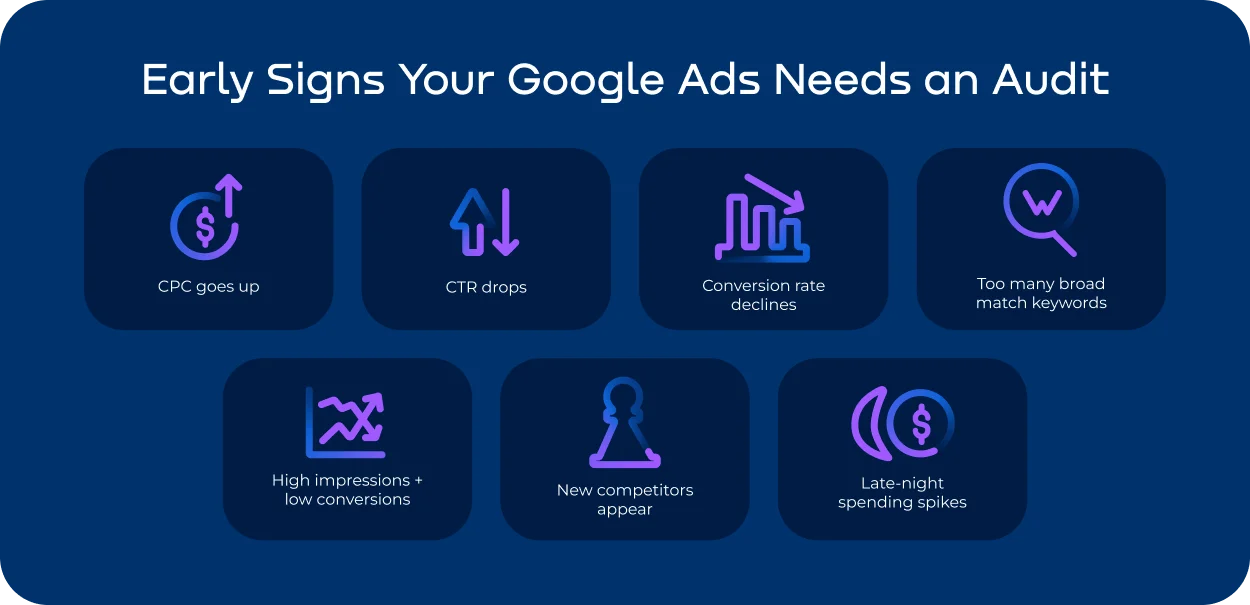
This PPC checklist can help you spot early warning signs:
-
- CPC goes up even though nothing has changed in the auction
-
- CTR drops while your average position stays the same
-
- Conversion rate declines with no changes to your site or landing pages
-
- Broad match makes up too large a share of your keywords
-
- Impressions stay high, but conversions are low
-
- New competitors appear in your auction insights
-
- You see unusual spending spikes during late-night hours
PPC Audit Checklist: The 12 Essential Steps That Reveal Issues
Step 1. Account Structure Review
Every paid search audit starts with reviewing the account structure, as it ensures your campaigns are logically organized and easy to optimize.
- • Campaigns are grouped by intent, product category, and brand vs. non-brand keywords
- • Naming is consistent and descriptive
- • Broad and exact match keywords aren’t mixed in the same ad group
- • There are no duplicate keywords across ad groups
- • No campaigns are using a lot of budget while delivering weak results
Step 2. Keyword Targeting Audit
This part of the Google Ads audit helps improve relevance and ensures your ad groups work together — not against each other.
- • No irrelevant or outdated keywords
- • The mix of branded vs. non-branded keywords matches your marketing goals
- • No keyword duplication across campaigns or ad groups
- • Your main keywords are getting a steady number of clicks according to Search Terms Report
- • Broad match isn’t bringing in irrelevant traffic
- • Your basic negative list covers irrelevant themes and competitor noise
- • Cross-negatives prevent your own advertisements from competing against each other
Pro tip: pay attention to branded keyword waste. If your branded CPC starts rising, it could mean competitors are bidding on your brand or affiliates are hijacking traffic. Google Ads doesn’t catch these issues, so external PPC audit services can help. Try Bluepear — a fast and easy-to-use tool that spots PPC fraud and competitive brand bidding by capturing real search results and giving clear evidence for brand protection.
Step 3. Ad Copy Review
This step focuses on message clarity and the match between your propositions and what people are searching for. Your PPC audit report should show whether your ads meet these requirements:
- • Ad text matches the intent behind the keywords
- • Value propositions clearly correspond with what users are looking for
- • Each A/B test is built around one clear variable — like the headline, CTA, or value proposition;
- • No tests are running too long or giving unclear results
- • CTAs match the user’s stage of intent (awareness vs. decision)
- • No expired seasonal offers, outdated promotions, or outdated claims
Step 4. Landing Page Alignment
This PPC audit check verifies that your landing pages help conversions instead of blocking them.
-
• Close match between keywords, ads, and LP headlines
-
• Page loads quickly on all devices
-
• The main CTA is clearly visible without scrolling
-
• No layout issues on mobile
-
• No friction points like too many form fields or extra steps in checkout
Step 5. Ad Extensions Audit
This part of the PPC checklist ensures every extension is consistent.
- • All URLs are active and relevant
- • Each sitelink leads to a high-intent or high-value page
- • Callouts show real benefits, not vague statements
- • No duplicates
- • No overly generic messages
- • Snippets match ad messages and landing page content
- • Structured snippets are used
- • Services, pricing, and product lines are up-to-date
- • No extensions linked to old promotions or expired campaigns
- • Extensions add new information instead of repeating the main ad
Step 6. Conversion Tracking Audit
Here you check that your advertisements work toward real business results — not just pageviews or reports that look good on paper. During a paid search audit, pay close attention to the following:
- • Each conversion reflects a real user action
- • Duplicate conversion events are removed or merged
- • Attribution is clear and correct
- • GA4 events match conversions in Google Ads
- • First-party tracking is active and working
- • Server-side or enhanced conversions are set up
Step 7. Budget Allocation
A proper PPC audit always checks whether your ad spend is actually generating returns. This step helps restore spending efficiency and shows which campaigns deserve more budget.
- • No campaigns with weak performance absorbing excessive budget;
- • Budget goes toward high-ROAS and consistently converting campaigns
- • Time-of-day settings don’t limit your impression share
- • Daily budgets aren’t running out too early
- • Reduced spend on segments that exceed CPA or ROAS targets
- • Balanced budget between branded, generic, and remarketing segments
| Segment | Purpose | Recommended Budget Share |
|---|---|---|
| Branded | Brand protection, lowest CPC, highest conversion rate | 30–50% |
| Generic / Non-branded | Acquiring new customers, expanding reach | 40–60% |
| Remarketing / Retargeting | Bringing back visitors, boosting conversions | 10–20% |
Step 8. Bidding Strategy Review
This step ensures your bidding methods match your goals — and that Google Ads automation isn’t working against you.
- • Manual bidding is used for new or low-volume campaigns
- • Stable campaigns are set to Max Conversions, tCPA, or tROAS
- • Learning phases work as expected
- • Automation isn’t stuck or resetting too often
- • Bid strategies match the right conversion goals
- • No excessive bid adjustments
Step 9. Audience & Geo-Targeting
This step of the paid search audit helps cut unprofitable segments, focus on high-intent groups, and update your targeting.
- • Exclusion lists block invalid and low-quality audiences
- • Custom audiences are based on fresh and relevant data
- • Remarketing lists show recent activity and enough volume
- • Regions with high CPA are prioritized
- • No low-value areas delivering poor conversion quality
- • Time-zone settings prioritize profitable hours
Step 10. Competitive PPC Monitoring
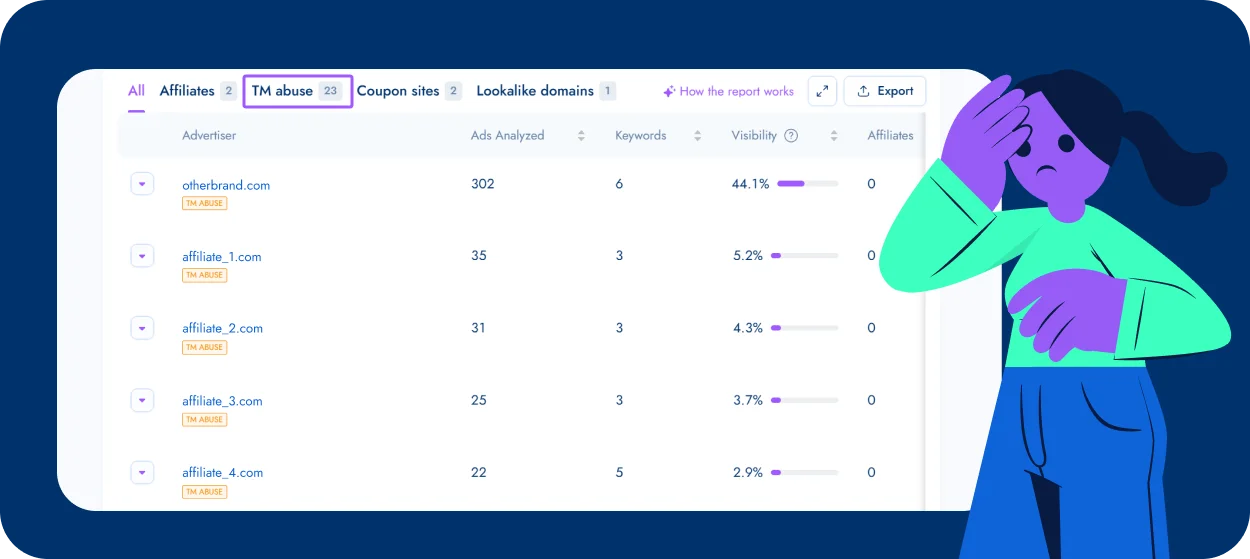
This step is imperative for understanding whether your customer acquisition is suffering from aggressive competition. To monitor these risks, you’ll need specialized tools.
The PPC threats that Google Ads reports and manual checks can’t reveal:
- • GEO-specific that only show in certain locations
- • Ads limited to specific devices or times, like mobile-only or night-only campaigns
- • Placements hidden by IP filters
- • Affiliate ad hijacking
- • Competitors bidding on your brand name
Bluepear offers a PPC analysis that fills the gaps left by Google Ads. It uncovers threats like:
- • Competitors bidding on your branded keywords
- • Unauthorized affiliate activity or ad hijacking
- • Cloaked ads and hidden redirects
- • Trademark infringement
- • Ads that only appear in certain regions, devices, or time slots
When Bluepear detects an issue, it provides:
Real SERP screenshots from residential IPs
Full redirect chains
Ad evidence logs
Automated alerts for violations
You can test Bluepear with a free trial. Just register an account and put in your branded keywords. Automated PPC monitoring starts working right away and a full report will be ready in about an hour.
Step 11. Technical Audit
This part of the Google Ads audit ensures that your tracking templates, URLs, redirects, and feeds are working correctly across all devices and ad formats.
- • No errors in URL tracking templates
- • UTM parameters are filled in correctly
- • No 404 errors, load failures, or redirect loops on landing pages
- • SSL certificate is active
- • Mobile versions work as intended
- • Data in Google Merchant Center is accurate
Step 12. Final Performance Analysis
This final step ensures that your findings don’t get lost in documentation but actually translate into measurable improvements. To compile the perfect PPC audit report, pull everything into a clear, actionable summary:
-
- Group campaigns: keep top performers, pause low performers, and test new opportunities
-
- Highlight quick wins — simple fixes that bring fast results
-
- Build a structured 30-day optimization roadmap
PPC Audit Template
| What to Check | Why It Matters | Fix |
|---|---|---|
| Account structure | Disorganized setup inflates CPC and hides performance issues | Segment campaigns by intent/product/brand; clean duplicates; fix naming |
| Keyword relevance | Irrelevant or overlapping terms waste budget | Remove weak queries; optimize match types; add negatives |
| Branded keyword performance | Rising brand CPC often means competitor bidding or affiliate hijacking | Use external monitoring and add protective negatives |
| Ad–query message-match | Low relevance reduces CTR and Quality Score | Refresh ads; update CTAs; align copy with search intent |
| Landing page alignment | Mismatched messaging kills conversions | Ensure 1:1 keyword→ad→LP flow; fix load speed; simplify UX |
| Ad extensions | Missing or outdated extensions lower ad strength | Update sitelinks/callouts/snippets; keep content concise |
| Conversion tracking | Bad tracking leads to wrong bidding signals | Remove duplicates; validate GA4 events; ensure real conversions only |
| Budget allocation | Poor spend distribution hides profitable segments | Reallocate toward ROAS-positive campaigns; adjust daily limits |
| Bidding strategy | Wrong strategy causes volatility or underdelivery | Use manual for low volume; switch to Max Conv/ICPA/tROAS when stable |
| Audience & geo targeting | Low-value segments inflate CPA | Exclude weak geos/audiences; refine custom lists; adjust time zones |
| Competitive activity | Hidden competitor advertisements distort CPC and brand metrics | Use Bluepear for real-SERP evidence, cloaking detection, and alerts |
| Technical setup | Broken URLs and feed issues block conversions | Fix UTMs, redirects, 404s; validate Merchant Center feeds |
Why Your PPC Audit Should Include Brand Monitoring
What a standard paid search audit cannot detect is what happens outside your Google Ads account — like brand abuse, affiliate hijacking, and trademark misuse. And that’s often where the biggest budget leaks occur: for example, ad hijacking caused an estimated $12.6 billion in losses globally in 2023 (Juniper Research). Competitors often target branded queries because they convert well and cost less. This drives up your CPC and destabilizes impression shares. Industry cases prove this: CPC for “Walmart clothes” rose 16 times from 2022 to 2024 due to aggressive brand bidding by Temu and Shein (reported by Zawya). The problem is: Google Ads doesn’t show you who is bidding on your brand, where, or when. So you might see your paid ad performance drop without even knowing the real cause.
What a standard Google Ads audit can’t uncover:
- • Ad hijacking hidden behind redirects
- • Cloaked advertisements impossible to track with manual checks
- • Ads only visible in certain locations or time frames
- • Trademark misuse and unauthorized affiliate ads using your brand terms
These invisible threats affect your CPC, CTR, Conversion Rate, and ultimately ROAS, even if your account setup is perfect. Bluepear uncovers the issues no PPC interface reports: cloaked ads, affiliate hijacking, competitor encroachment, and trademark violations. There’s no long consultation process, no mandatory commitments, and no hassle. Bluepear is a ready-for-use solution for brand protection and PPC audit services, starting at $169 per month after a free trial.
Final thoughts
A PPC audit is among some of the most effective ways to stop marketing budget waste and stabilize your Google Ads performance. When you add ongoing brand and competitor monitoring with Bluepear, you also protect your branded traffic from outside threats.
FAQ
1. How often should I perform a PPC audit?
Ideally, you should do a full audit at least once every quarter. If you notice early warning signs — like rising CPC, falling CTR, or unexpected conversion drops — run a targeted audit right away to stop wasted spend. Ongoing PPC monitoring is also crucial. It alerts you as soon as unauthorized activity starts, whether from competitors, affiliates, or fraudsters. Tools like Bluepear offer this kind of always-on protection.
2. Is a PPC checklist for Google Ads audit useful for other platforms?
Yes. The recommendations for account structure, keywords, ad copy, audience segmentation, landing pages, tracking, and competitive monitoring apply to Bing, Yandex, Baidu, and other paid search platforms.
3. What’s the fastest way to see ROI improvements after an audit?
Start with high-spend, low-performing campaigns. Optimize targeting and ad copy, and fix tracking issues. Small improvements here often bring the biggest cost savings and conversion gains.
4. Do I need special software for a competitive paid search audit?
If your account is large, competitive, or you suspect PPC fraud, professional tools can save time and uncover hidden issues. Platforms like Bluepear provide automated alerts, real-SERP evidence, and insights that are hard to get manually.

Run a Competitive PPC Analysis